

The information below is primarily for California. However, much of it still applies nationwide.
Interesting Fact
The sun essentially provides an endless supply of energy. In fact, with the amount of sunlight that hits the earth in 90 minutes, we could supply the entire world with electricity for a year — all we have to do is catch it!
The Cost of Grid Electricity
The price of electricity is measured in cents per kilowatt-hour (kWh). According to the US Bureau of Labor Statistics, the national average price for electricity in July 2022 was $0.166 per kWh.
Seattle had the lowest price of any major metro area at $0.118 per kWh while San Diego, Houston, Urban Hawaii, and San Francisco all had electricity rates above $0.311 per kWh.
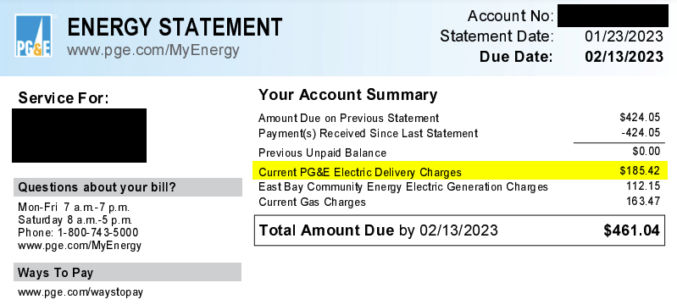
In January 2023, my PG&E energy bill was $461.04. The electricity portion alone was about $300. Looking at the bill below, the electricity portion is divided into two:
- Delivery charges: This is the cost PG&E charges to just deliver electricity to my house.
- Generation charges: This is the cost to generate electricity, e.g. by solar, wind, etc.
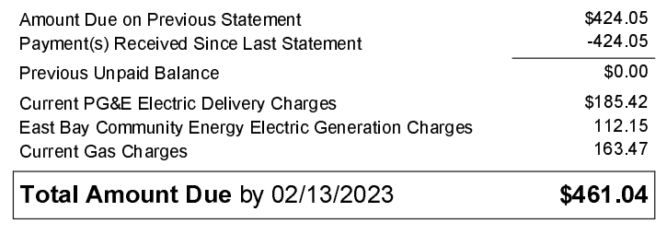
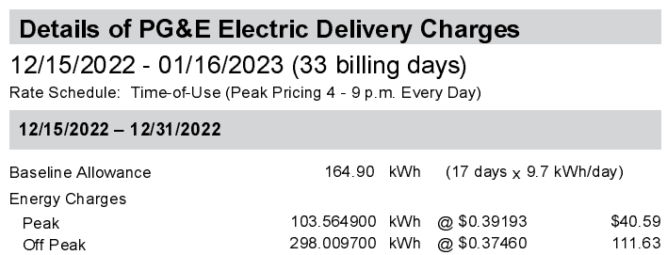
The delivery rate averages $0.38 / kWh.
The generation rate averages $0.14 / kWh.
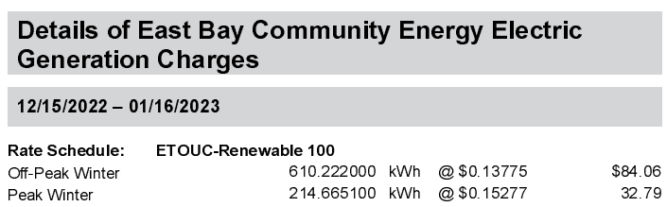
The cost to deliver electricity is way more than the cost to generate it. Adding the two rates up, we get $0.38 + $0.14 = $0.52 / kWh.
According to the California Energy Commission, 66.4% of California’s energy comes from non-renewable sources and 33.6% comes from renewable sources. 14.2% comes from solar.
Factoring in discounts and the 30% federal solar tax credit, the average price of solar is between $0.06 and $0.08 per kWh.
Trends
In the last 20 years, the price of grid energy has increased by 2.79% per year on average, according to the U.S. Energy Information Administration (EIA). And the EIA is projecting a 2.54% increase from 2022 to 2023.
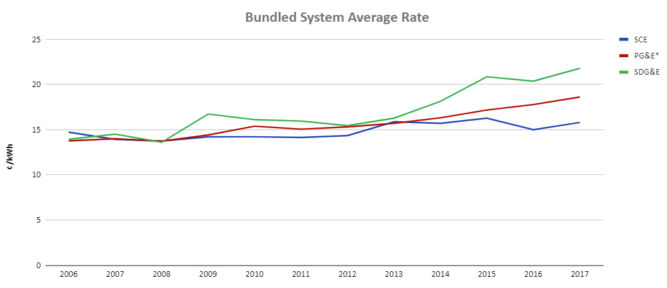
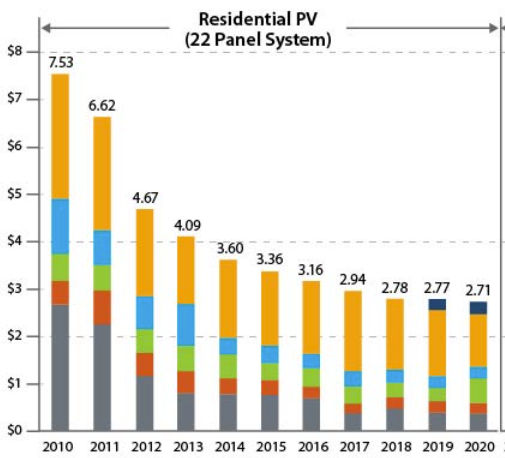
The cost of solar panels has gone down over the last decade.
How Home Solar Works
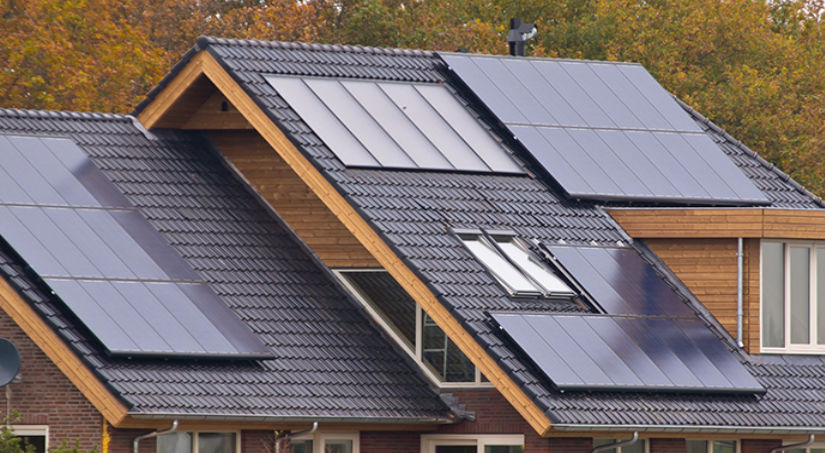
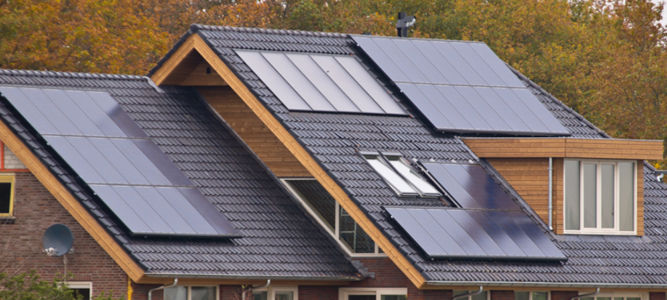
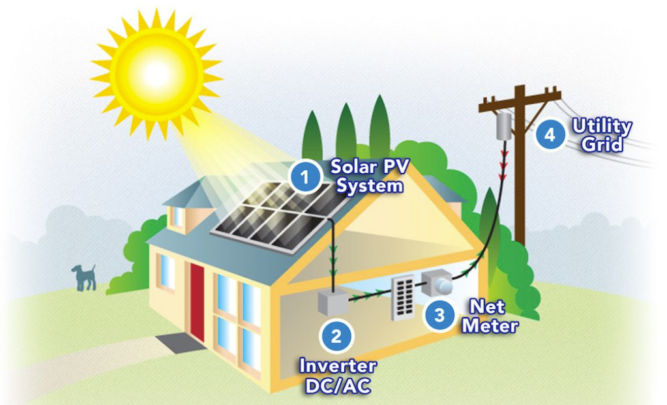
- Your solar panels convert sunlight to DC electricity.
- Your inverter converts DC electricity to AC.
- Electricity is used to power your home.
- Extra electricity is sent to the utility grid for a credit, or to your battery if you have one.
Solar Panels
Solar panels are modular pieces, usually rectangular in shape – approximately 3’ by 5’ long.
| PERC | Monocrystalline | Polycrystalline | Thin-film | |
|---|---|---|---|---|
| Initial Cost | Highest | High | Middle | Highest to lowest: CIGS CdTe a-Si |
| Efficiency | Highest (5% more than monocrystalline) | 20% and up | 15-17% | CIGS: 13-15% CdTe: 9-11% a-Si: 6-8% |
| Appearance | Black with rounded edges | Black with rounded edges | Blue with square edges | Depends on the thin-film variant |
| Advantages | Requires least space. Most efficient. Highest power capacity | Less expensive alternative to PERC panels without the passivating layer | Middle option in terms of cost, efficiency and power capacity | Lowest cost, Easier to install |
| Disadvantages | Most expensive initially. Some earlier panels suffered from light and elevated temperature induced degradation | High initial cost. Low yield in the manufacturing process | Low heat tolerance, not suitable in hot environments | Shorter lifespan than crystalline panels, requires more space, Least efficient |
Most Popular Solar Panels of 2022
From January to December 2022, manufacturers REC and Hanwha Q CELLS had the most popular panels for residential solar.
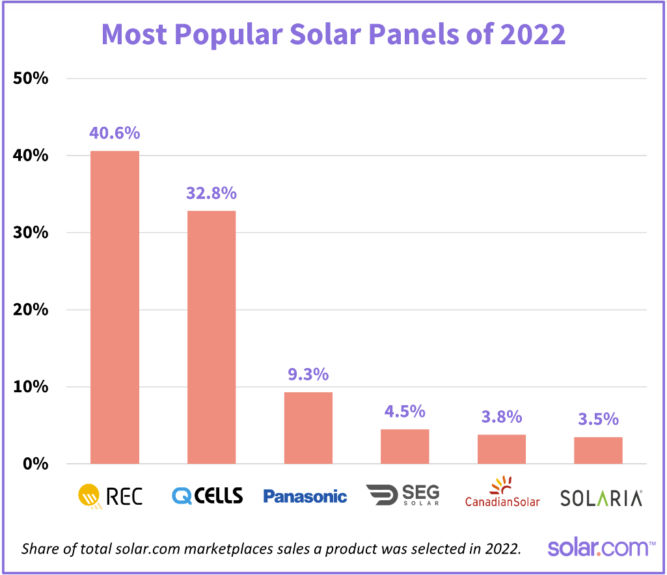
There are nearly 50 REC models and 80 Q CELLS models available through the solar.com network, ranging in wattage from 265W to 450W (although 400W is now considered the norm, and anything under 365W is considered rare).
REC and Q CELLS back their panels with a 25 year product warranty.
Best solar panels manufactured in the US
| BRAND – HQ LOCATION | PANEL | MANUFACTURE LOCATION | WHY SOLAR.COM LIKES IT |
|---|---|---|---|
| Silfab – Canada | SIL Mono series | Bellingham, Washington | Durable, >20% efficient |
| Q Cells – Korea | Q. Peak Duo Series | Dalton, Georgia | Durable, >20% efficient |
| Mission Solar – US | MSE PERC series | San Antonio, Texas | Qualifies for Buy American Act |
| Solaria – US | Power XT series | Fremont, California | >20% efficient, superior shade performance |
Best solar panels made overseas by US-based companies
| BRAND – HQ LOCATION | PANEL | WHY SOLAR.COM LIKES IT |
|---|---|---|
| Sunpower – San Jose, CA | A-series | Up to 22.8% efficiency, 25-year warranty, built-in AC inverter |
| Sunpower – San Jose, CA | X-Series | Up to 22,7% efficient, extremely low degradation rate, 25-year warranty |
| SEG – Pleasanton, CA | SEG-410-BMD-HV | 21.25% efficiency, 25-year warranty |
| Aptos Solar – Santa Clara, CA | DNA-120-MF26-370W | 20.29% efficiency, durable, 30-year warranty |
Top 3 solar panels by degration rate
| PANEL | DEGRADATION RATE | PERFORMANCE WARRANTY |
|---|---|---|
| SunPower X-Series | 0.2% to 0.25% per year | 92% of minimum peak power after 25 years |
| Panasonic EverVolt® Photovoltaic series (EVPV) | No more than 0.25% per year | 92% of maximum power after 25 years |
| REC Alpha series | No more than 0.25% per year | 92% of nameplate power output after 25 years |
Best solar panels for efficiency
Residential solar panels typically range between 15% and 20%, with the industry leading panels pushing 23%.
| MANUFACTURER | MODEL | EFFICIENCY RATING |
|---|---|---|
| SunPower | A-series | Up to 22.8% |
| SunPower | X-series | Up to 22.7% |
| Panasonic | EverVolt® Photovoltaic series | Up to 22.2% |
| SunPower | M-series | Up to 22% |
| REC | Alpha series | Up to 21.9% |
| Silfab | Elite series | Up to 21.4% |
| SEG | SIV AC Module Series | Up to 21.25% |
| Silfab | X series | Up to 21.1% |
| Solar World | Sunmodule series | Up to 21.1% |
| S-Energy | SL40-60MCI-370 | 21.04% |
Solar Panel Efficiency
There are a number of factors that influence solar panel efficiency. They include:
- Temperature — Solar panels operate best in temperatures between 59 and 95 degrees Fahrenheit
- Type of solar panel — Solar panels typically range from 15-20% efficient, with the best panels pushing 23%.
- Shading — Solar panels perform best in wide-open sun. Even partial shading can substantially reduce the efficiency of a panel
- Orientation and angle — Solar panels perform best when they are directly facing the sun and are often tilted to increase efficiency
Cloudy Days
Solar panels still generate electricity on cloudy days, although not as effectively as sunny days. Solar panels can capture both direct and indirect light (light that shines through clouds), but perform at around 10-25% of their normal efficiency when it’s cloudy.
Cloudy days can be beneficial, however, as rain washes the panels and increases their overall efficiency.
Color
If you’ll have solar panels that are visible, e.g. from the street, you may want to pick ones that look good. Most solar panel frames are anodized aluminum and come in silver or black. Choosing a black frame can enhance the look of your system greatly. You may be interested in getting “all black” panels, where the frame, backsheet, and cells are all the same black color.
Inverters
Most inverters have warranties ranging from anywhere between 5 and 10 years, though some can be extended to 25 years.
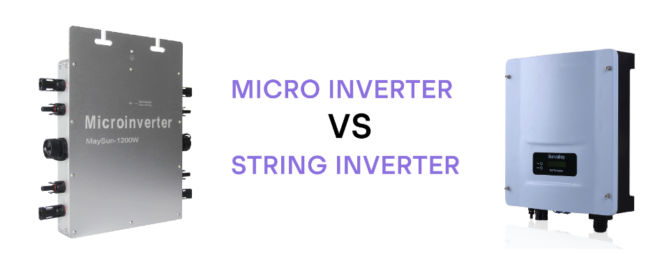
There are 2 types of inverters.
String inverter
Pros
- Lowest cost
- Standard inverter
- Performs well with no shade
Cons
- Overall production decreases if one panel is damaged or shaded
- No ability to monitor each panel individually
- Not optimal if your solar panels are facing different ways
- Increasing power needs are more difficult and may require second central inverter installation
Microinverter
Pros
- Shade from a nearby tree won’t reduce the whole solar panel system power output
- Individual panel monitoring available
- Increasing power needs are easier and less expensive than installing a second central inverter
- Good for rooftops where solar panels may face different directions
Cons
- Higher initial cost
- Not necessary if all panels face the same way and are not shaded
Power Optimizers
Power optimizers can optimize the power before sending it to a central string inverter.
Pros
- More efficient than string inverters
- Less expensive than micro-inverters
- Individual panel monitoring available
Cons
- Higher initial cost
- Not necessary if all panels face the same way and are not shaded
Solar Inverter Efficiency
Peak (max) efficiency and weighted (average) efficiency
Clipping/Scalping
If the solar panel DC output exceeds the max power rating of the inverter, the excess power is clipped (wasted).
It’s normal for the DC system size to be about 1.2x greater than the inverter system’s max AC power rating. For example, a 12 kW solar PV array paired with a 10 kW inverter is said to have a DC:AC ratio — or “Inverter Load Ratio” — of 1.2.
Solar Monitoring System
In order to ensure your solar system is producing energy normally, it’s important to make sure your solar panels are paired with an energy production monitoring system.
Solar Mounting and Racking System
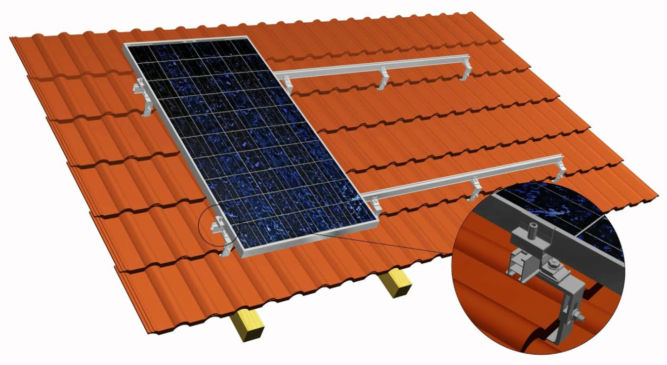
It’s important to make sure your racking system, if roof-mounted, is properly flashed and sealed to ensure your roof is well-protected against the elements.
Roof Type
| Roof Material | Note |
|---|---|
| Composite shingles | Most common roof material. Easy and cheap to install solar panels on them. |
| Clay Tiles | More expensive to install than all other roof types. |
| Concrete Tiles | Cheaper to install than clay tile roofs but more expensive than shingles. |
| Metal Standing Seam | Easy and cheap to install. |
| Tar and Gravel | More expensive to install than clay tiles. |
| Wood | Not recommended for installing solar panels |
Warranties
Most major solar manufacturers including REC, SunPower, and Panasonic offer warranties that guarantee a certain level of output over 25 years, and some companies are beginning to offer 30-year warranties. The performance warranty guarantees that a panel’s output capacity will not drop by more than 0.7% per year, or less than 20% over 25 years.
Solar panels don’t disappear when they reach the end of their warranty, their production capacity just slowly degrades over time.
Solar Equation
The average energy needs of a U.S. household is a 6.62-kW solar system to match the 9,000 kWh of average energy usage by U.S. households each year. And, the typical solar panel makes 320 watts of electricity in ideal sunny conditions. Here’s how many solar panels that equals.
Divide 6.62 kW (the system size) by .320 kW (the wattage per panel) = 20.69—rounded up that’s 21 panels. While your home is far from average, this is how you can calculate your own rough estimate.
Solar Panel Wattage VS Efficiency
Solar panels are rated based on the watts they generate. The higher the wattage rating, the greater amount of power your solar installation will produce. Most residential solar panels have power output ratings from 250 to 400 watts, depending on panel size and how well they convert sunlight into energy. While higher power ratings are considered preferable, power output is not the sole factor in judging a solar panel’s performance.
For instance, two solar panels may each have a 15% efficiency rating, yet the power output rating of one is 250 watts and the other is 300 watts.4 The higher output may simply be due to the 300 watt panel’s larger physical size–rather than having a high efficiency or more advanced technology. Therefore, panel efficiency is a better indicator of solar panel performance than just power output for meeting your energy needs.
Incentives
The solar investment tax credit (ITC) is a 30% tax credit that you are allowed to claim in the form of a deduction from your income taxes (after any available rebates) off the overall gross system cost, including any necessary upgrades to the main panel box upgrades in order to go solar.
In August 2022, the Inflation Reduction Act increased the tax credit from 26% to 30% and extended it until 2032. It also renamed it the Residential Clean Energy Credit (although most people still call it the ITC or solar tax credit).
So if you purchased a solar system worth $25,000 in 2022, you can claim a $7,500 deduction on your 2022 taxes that you file in early 2023.
The new and improved solar tax credit also applies to battery storage, whether or not it’s connected to solar. So you can claim the tax credit for adding battery storage to an existing solar system or for battery storage that’s not connected to solar at all.
Learn how to get your federal solar tax credit.
Net Energy Metering (NEM)
Net Energy Metering (NEM) is the policy that allows you to push and pull energy to and from the grid through your electrical meter. Traditional utility users pull energy from the main grid, use the energy in their home, and the meter counts how much is used. With solar, you will push your excess energy into the grid during the day and pull it out at night to use for lights, TV, A/Cm or anything else you may need. The grid functions as a bank storing your energy from your solar panels until you are ready to use it. With a battery backup system and secure power supply, you can use the energy from your system when the grid goes down.
Net Energy Metering Credits
If you don’t use all the energy your system produces in a day, that energy will roll over to the next day and so on. This happens day after day, month after month. This allows you to use all the energy you produce with your solar system. If you have higher usage months (AC, guests, holidays, etc) you draw from the extra energy credits you earned earlier in the year.
Solar True-Up
Once a year you “true up” with your utility where you settle the balance on your energy credit. If you consume more than you produce then you’ll pay the utility for the excess energy you pulled from the grid. If you produce more energy than you consume, the utility will compensate you for your excess energy at a below-retail rate.
NEM 1.0, 2.0 and 3.0
In most cases, 1 kWh of electricity pushed onto the grid offsets 1 kWh of electricity pulled off the grid.
However, energy utilities are making a nationwide push to weaken net metering by paying less than retail prices for solar exports. Most notably, California’s NEM 3.0 reduces the export rates by over 75%.
NEM 3.0 Final Decision: The California Public Utilities Commission (CPUC) unanimously voted to approve NEM 3.0. Under NEM 3.0, customers of PG&E, SCE, and SDG&E with solar systems will receive an average of 8 cents per kWh for the excess power they push onto the grid. This is roughly 75% less than the average export rate of 30 cents per kWh under NEM 2.0. IOU customers have until April 13, 2023 to grandfather a new solar system into NEM 2.0 by submitting a complete interconnection application.
NEM 3.0 key takeaways:
- Current solar owners will remain under their existing net metering policy
- Solar owners under NEM 3.0 will earn around 75% less for the excess electricity they push onto the grid
- Under NEM 3.0, the payback period for solar and battery storage systems will be roughly equal to the payback period of solar only systems
- Californians can be grandfathered into NEM 2.0 by submitting an Interconnection Application for a new solar system by April 13, 2023
Payback period and savings under NEM 2.0 vs NEM 3.0
Scenario 1: Cash purchase of an average 7.6 kW system with 100% offset
| SOLAR UNDER NEM 2.0 | SOLAR UNDER NEM 3.0 | |
|---|---|---|
| Monthly energy bill (previously $250) | $18 | $96 |
| Payback period | 4.6 years | 6.5 years |
| Lifetime savings | $116,680 | $73,620 |
Scenario 2: 12-year loan for an average 7.6 kW system with 100% offset
| SOLAR UNDER NEM 2.0 | SOLAR UNDER NEM 3.0 | |
|---|---|---|
| Monthly energy bill (previously $250) | $162 | $239 |
| Down payment | $0 | $0 |
| Lifetime Savings | $110,308 | $67,248 |
Scenario 2: 20-year loan for an average 7.6 kW system with 100% offset
| SOLAR UNDER NEM 2.0 | SOLAR UNDER NEM 3.0 | |
|---|---|---|
| Monthly energy bill (previously $250) | $123 | $200 |
| Down payment | $0 | $0 |
| Lifetime Savings | $105,844 | $62,784 |
How to grandfather a solar system into NEM 2.0
There are two steps required to grandfather a solar system into NEM 2.0.
- Submit a solar interconnection application to your utility before April 13, 2023
- Install and receive permission to operate (PTO) within three years of submitting your interconnection application
Quick Note: NEM 3.0 is not retroactive. Existing solar systems will remain under their current net metering policy for 20 years from their interconnection date.
According to the final NEM 3.0 proposal, a valid solar interconnection application includes:
- Complete application
- Signed contract
- Single-line diagram
- CSLB Disclosure Document
- Signed consumer protection guide
- Oversizing attestations (if applicable)
Typically, solar installers submit the interconnection application after the system has been installed. However, in response to NEM 3.0, many – but not all – companies are changing their operations process to submit as early as possible.
Since solar installations typically take 3-5 months to line up, it’s important to find an installer that has changed their process to submit interconnection applications early.
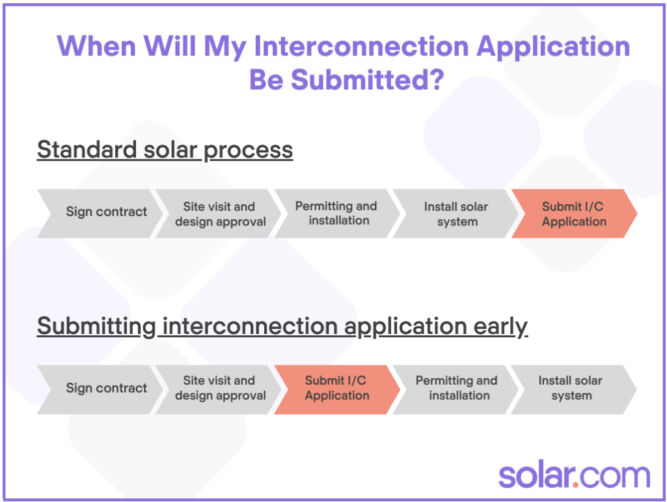
Beginning in January, you should be able to get emailed proof that you have been grandfathered within 2-3 weeks of signing the contract.
Solar Increases Your Home Value
According to Zillow, nationally, homes with solar-energy systems sold for 4.1% more on average than comparable homes without solar power. For the median-valued home, that translates to an additional $9,274.
A 10-year study concluding in 2015 by the Lawrence Berkeley National Laboratory found that solar panels add around $4 per watt of capacity installed – or $4,000 per kW. Here’s how that adds up based on the size of your system:
| SOLAR SYSTEM SIZE | INCREASE TO HOME VALUE FROM SOLAR PANELS* |
|---|---|
| 4 kW | $16,000 |
| 5 kW | $20,000 |
| 6 kW | $24,000 |
| 8 kW | $32,000 |
| 10 kW | $40,000 |
Solar Installation Company
Factors to consider when choosing an installation company are
- their number of installations,
- their locations,
- their bankability,
- their online reviews,
- their certification,
- length of their workmanship warranty covering
- roofing penetrations,
- water damage,
- electrical work, and
- anything related to their installation for the time period described
Installers who are NABCEP-certified are knowledgable and have solar experience. North American Board of Certified Energy Practitioners (NABCEP) certification requires installers to
- Pass an exam
- Sign a code of ethics
- Possess at least one year of installation experience
Solar Panel Maintenance
Solar PV systems require almost zero maintenance. Be wary of these ‘maintenance packages’ as they are often overpriced.
System Size
To determine the size of your solar system and the number of panels you’ll need, you need to know how much electricity you use on average per day.
Looking at my PG&E electricity usage and cost over the last 12 months below, we find that my average monthly electricity usage was 527 kWh. But, since I bought a plug-in hybrid and started charging my car in October, I’ll take my average to be from the last 3 months, which is 709 kWh. Of course, the last 3 months of the year were cold and daylight ended early at around 5 PM, so my electricity usage went up for other reasons as well. We’ll assume my average monthly electricity needs is 700 kWh and my annual usage would be 700 x 12 = 8400 kWh / year.
| Start Date | End Date | kWh | Cost | Note |
|---|---|---|---|---|
| 2022-01-18 | 2022-02-15 | 656.84 | $168.47 | |
| 2022-02-16 | 2022-03-17 | 577.84 | $134.91 | |
| 2022-03-18 | 2022-04-18 | 494.57 | $102.54 | |
| 2022-04-19 | 2022-05-17 | 358.42 | $68.48 | |
| 2022-05-18 | 2022-06-15 | 372.67 | $82.26 | |
| 2022-06-16 | 2022-07-17 | 443.17 | $110.39 | |
| 2022-07-18 | 2022-08-16 | 416.57 | $103.91 | |
| 2022-08-17 | 2022-09-15 | 452.3 | $115.19 | |
| 2022-09-16 | 2022-10-16 | 420.99 | $94.50 | |
| 2022-10-17 | 2022-11-15 | 604.61 | $136.73 | Includes charging EV |
| 2022-11-16 | 2022-12-14 | 695.44 | $162.45 | Includes charging EV |
| 2022-12-15 | 2023-01-16 | 824.89 | $185.42 | Includes charging EV |
| Average | Last 12 months | 527 kWh | $122 | |
| Average | Last 3 months | 709 kWh | $161 |
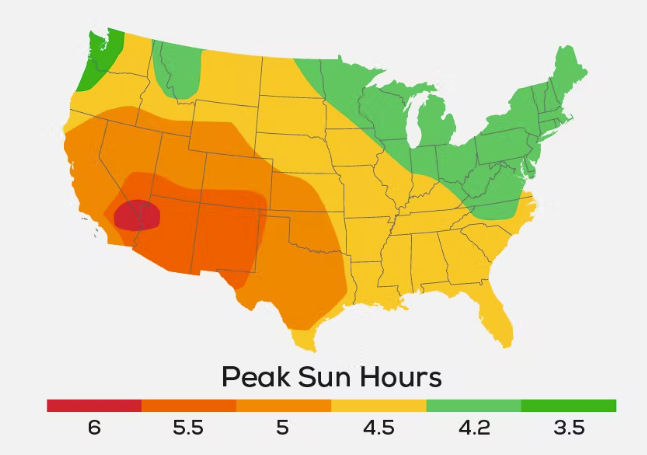
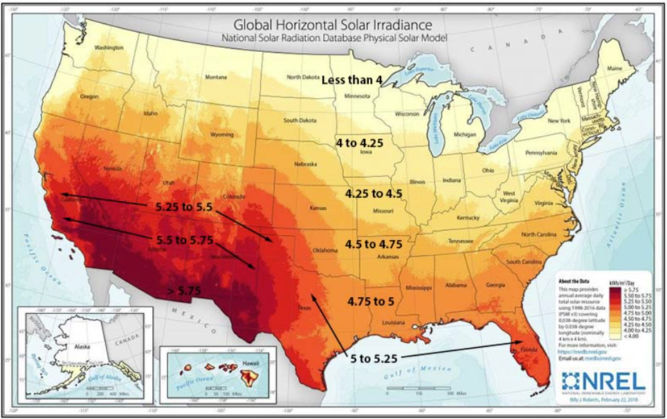
To continue this analysis, we’ll need the peak sunlight hours where I live. According to the map below, my peak sun hours is 5.
| A | Monthly electricity usage | 700 kWh / month | |
| B | Daily electricity usage | 24 kWh / day | A/30 |
| C | Hourly electricity usage (kWh) | 1 kWh / hour | B/24 |
| E | Solar panel system output needed per day | 5 kWh / day | F * peak sun hours (5) |
So, the solar panel system size I would need is a 5 kW system. But, since solar panels don’t operate at maximum efficiency 24 hours a day, we’ll add a cushion of 25%. That brings the system size to 5 kW x 1.25 = 6.25 kW.
The average solar panel produces 400 W. So, the number of panels I would need is 6250 / 400 = 15.6 panels.
For a 6 kW size, I was quoted $25,820. If I apply the 30% federal tax credit, I’d get $7,746, which brings the effective cost to $18,074. Since the minimum lifetime of the solar system is 25 hours, then we can calculate the cost per kWh as $18,074 / 25 years / 365 days / 24 hours = $0.08 / kWh. That’s a lot cheaper than my current electricity rate of $0.52 / kWh (PG&E generation + delivery rate).
Since my monthly electricity needs are 700 kWh. Then we can compare costs as follows:
| Cost / month | Cost / 25 years | ||
|---|---|---|---|
| Solar with 30% tax credit | 700 kWh * $0.08 | $56 | $16,800 |
| Grid | 700 kWh * $52 | $364 | $109,200 |
As you can see, going solar saves a ton of money. And that doesn’t even include the rising cost of electricity from the grid, which averages 2.2% per year.
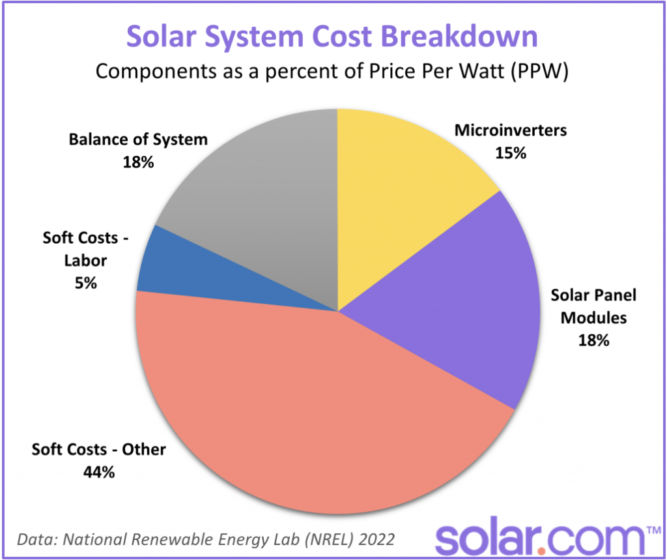
Cost Breakdown
Loans
“Same as cash” option
This means that the lender will fund the full amount of the loan, but only collect payments based on 70% of the outstanding balance during the first year or so. This amounts to a 30% discount on your payments for the first 12-18 months and makes Day One savings greater than on a traditional loan.
After the 12-18 months is over, the homeowner is expected to pay down the loan balance by the amount of the tax credit.
In the example used earlier, the homeowner would receive a $20,000 loan but only pay interest on $14,000. If at the end of the 12 month grace period the homeowner fails to pay back the tax credit amount, then the lender will start charging interest on the $6,000 portion from that point forward.
Combo Loan
Combo loans are independently financed. There are two separate loans.
The first loan is for 70% of the contract price, which has an interest rate (for which the homeowner qualifies). The second loan covers the remaining 30% of the contract price.
This second loan is meant to equal the federal tax credit amount and typically lasts for 18 months with 0% interest. If this amount is not paid off in that allotted time frame, the balance adopts the same APR as the first loan, whatever that may be.
Examples of combo loan financiers:
Interest Rates
Some lenders tout extremely low nominal rates (some as low as 1.89%). They don’t tell you is that there is something known as a ‘dealer fee’ that can run as high as 17%.
Make sure you check the following:
- True APR
- Monthly payments
- No dealer fees
- No prepayment penalty
Loan Term
The table below compares monthly payments and lifetime interest paid for a $20,000 loan at different terms and APRs.
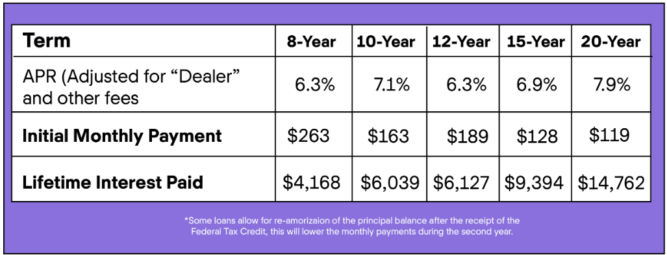
The most popular loan with Solar.com customers has a 12-year term, no pre-payment penalties, and interest rates of 2.99-4.99% depending on your credit score. The 12-year term is common because for most customers, their monthly loan payment is equal to or less than their current utility bill.
Sun Exposure
The more sun your solar panels get, the more money they can save you.
Comparison Shopping Checklist
Solar Panel
- Brand
- Type
- Number of panels
- Wattage per panel
- Efficiency
- Color
- Warranty (fine print)
- Company bankability
Solar System
- Size (kW)
- energy monitoring system
- All-inclusive total cost (permits, materials, warranties, taxes, financing costs, etc)
Inverter
- Type
- Max power input
- Peak efficiency
- Weighted efficiency
- Warranty (fine print)
Installation Company
- number of installations,
- their locations,
- their bankability,
- their online reviews,
- their certification (NABCEP),
- length of their workmanship warranty covering
- roofing penetrations,
- water damage,
- electrical work, and
- anything related to their installation for the time period described
- do they guarantee minimum daily energy production?
NEM 2.0 Grandfathering
- Is the company prepared to submit the documents needed for NEM 2 grandfathering early in the process?
Loan
- Length of loan
- True APR
- Monthly payments
- No dealer fees
- No prepayment penalty
Update
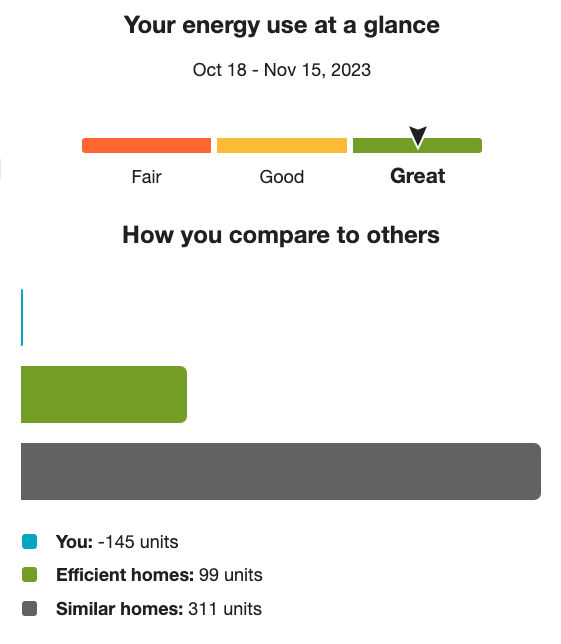
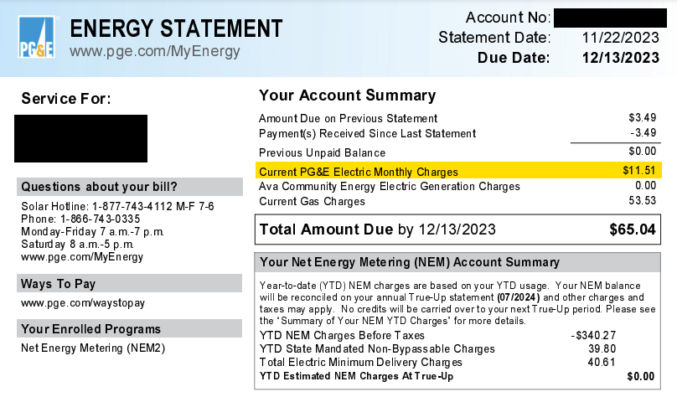
After installing solar panels, my electricity bill has gone down significantly.
Before Going Solar – Dec 23, 2022
After Going Solar – Nov 22, 2023
Before Going Solar – May 20, 2020 – Jun 17, 2020
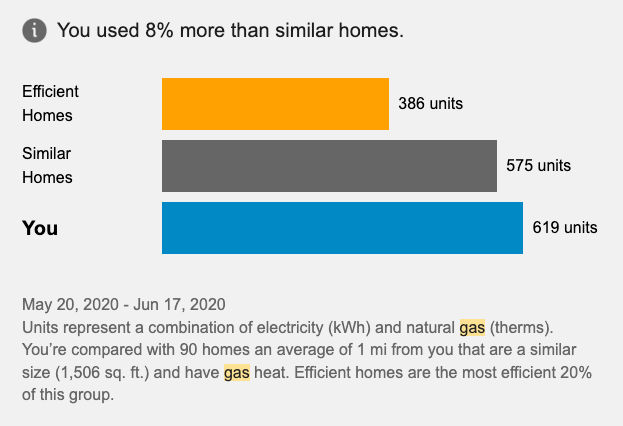
After Going Solar – Oct 18, 2023 – Nov 15, 2023